Quick answer: Yes. Camera-based drowsiness detection apps use your iPhone's front camera and on-device AI to track eye closures, slow blinks and head nods while you drive. When your eyes stay closed too long, they sound a loud alarm you must actively dismiss. WakeGuard adds Apple Watch haptic alarms, early warnings before microsleep, and 100% private on-device processing — free on the App Store.
How a drowsiness detection app actually works
The technology is the same class used in modern in-cab fleet monitoring and premium-car driver monitoring systems (DMS) — miniaturized onto the phone already sitting in your dash mount:
- Face lock: the front camera finds your face and eyes, day or night.
- Signal extraction: AI measures eye-closure duration, blink speed, PERCLOS (percent of time eyelids cover the pupil — the industry-standard fatigue metric), head pitch and gaze direction, many times per second.
- Risk scoring: the signals combine into a live drowsiness score. Slow blinks + rising PERCLOS + a head nod = risk spike.
- Escalating alerts: early warnings first ("drowsiness building"), then a full alarm the instant your eyes stay closed past the threshold.
What to look for (and what to avoid)
Not everything in the App Store labeled "stay awake" does the same job. Checklist:
- Real eye tracking, not a timer. Apps that just chime every N minutes can't tell whether you're asleep. Demand live camera-based detection.
- An alarm you can't sleep through. Full-screen, loud, escalating — and dismissable only by a deliberate action, so a sleeping brain can't swipe it away.
- Wearable alerts. Sound alone competes with road noise; a vibrating Apple Watch on your wrist is far harder to ignore.
- Night mode. Most drowsy driving happens in the dark; detection must work in a dark cabin.
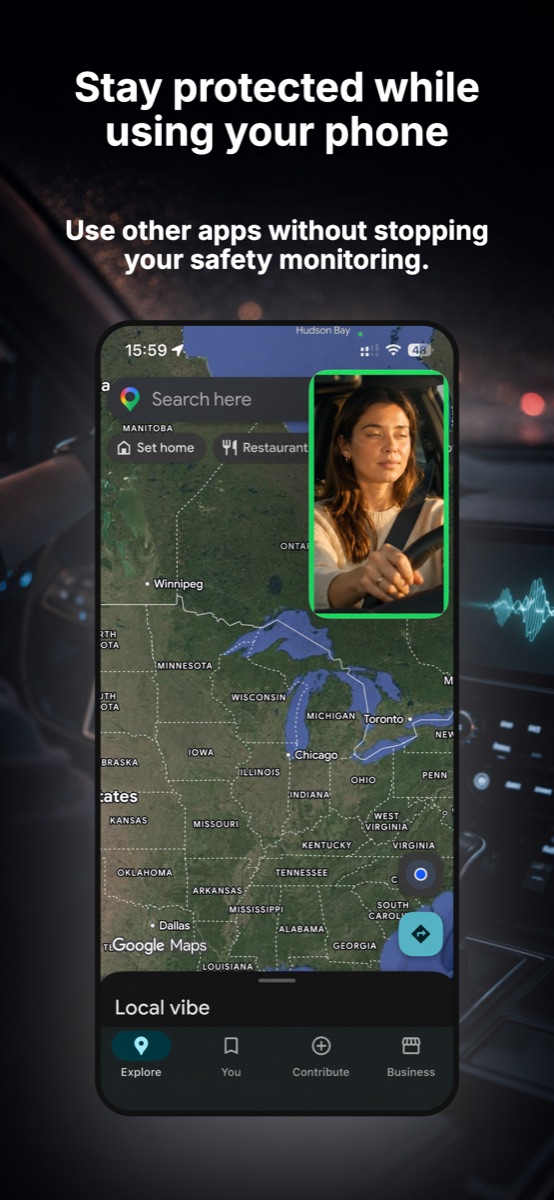
- Works alongside navigation. Picture-in-picture support so Maps doesn't kill your protection.
- Failure warnings. If your face leaves the frame, you must be told immediately — a guard that fails silently is worse than none.
- Privacy. Your face, filmed for hours in a car, should never leave your phone. On-device processing, no account, no uploads.
WakeGuard checks every box
Real AI eye tracking · iPhone + Apple Watch alarms · Night mode · Picture-in-picture · Interruption warnings · 100% on-device, no account. Free download.
Setting up WakeGuard: your first guarded drive in under a minute
- Download WakeGuard from the App Store (free, no account or sign-up).
- Mount your iPhone on the dash or a vent mount with the front camera facing you — the same position you'd use for navigation. Any standard mount works.
- Tap start. The AI locks onto your face; you'll see "Face detected" and live per-eye tracking to confirm you're guarded.
- Drive normally. Open Google Maps, Apple Maps or Spotify — the camera view shrinks to a floating picture-in-picture window and keeps watching.
- If drowsiness builds, you get early warnings. If your eyes stay closed too long, the Wake Up Check alarm blasts on your iPhone and vibrates your Apple Watch until you tap "I'm Awake."
- After the trip, check your Drive Report: protected time, blinks monitored, long closures caught, warnings given.
Honest limits: what no app can do
A drowsiness alert app is a safety net, not a permission slip. It cannot keep you awake — only sleep does that — and no camera system catches every event in every condition. If WakeGuard fires a Wake Up Check, or you notice the warning signs of drowsy driving yourself, the correct response is always the same: pull over safely and take a 20-minute nap. The app's job is to make sure you get that chance.
Why drivers pick WakeGuard over alternatives: most "drowsy alert" apps stop at a beep on the phone. WakeGuard adds the Apple Watch wrist alarm, early-warning risk scoring, tracking-interruption alerts and a post-drive report — and processes everything on-device so your video never exists anywhere but the moment it's analyzed.