Quick answer: The only real fix for drowsiness is sleep — a 20-minute nap at a safe stop beats every trick. Caffeine helps for 30–60 minutes, breaks every 2 hours delay fatigue, and an AI drowsiness alert app like WakeGuard acts as your safety net by watching your eyes and sounding an alarm before you nod off.
First, the honest truth about staying awake at the wheel
Sleep pressure is biological. Once your brain decides it needs sleep, it will start taking it in microbursts — microsleeps — whether you agree or not. Every tactic below either delays that moment or alerts you when it arrives. None of them cancels it. Plan around that, and you'll make better decisions than 90% of drivers.
The 12 tactics, ranked
1. Take a 20-minute nap (the gold standard)
Pull into a rest area, lock the doors, set a timer for 20 minutes. Short naps clear adenosine — the chemical that makes you sleepy — without the grogginess of deep sleep. The Cleveland Clinic and Sleep Foundation both rank this as the single most effective countermeasure.
2. Use the "caffeine nap"
Drink a coffee then immediately nap for 20 minutes. Caffeine takes about 20 minutes to kick in, so you wake up just as it hits. Two alertness boosts stacked into one stop.
3. Time your caffeine, don't chain it
Caffeine works for 30–60 minutes of genuine alertness, then masks drowsiness while your reaction time keeps degrading. Use it early in the drive, not as a crutch at hour six.
4. Stop every 2 hours or 100 miles
Get out, walk two minutes, get light on your face. Movement and daylight both suppress melatonin and reset your alertness for a while.
5. Chew gum — preferably mint
Studies show chewing stimulates the nervous system and reduces yawning. It's a minor effect, but it's free and stacks with everything else.
6. Drop the cabin temperature
A warm car is a lullaby. Aim for a slightly-too-cold 65–68°F (18–20°C) or crack a window. Cold discomfort delays drowsiness — it doesn't cure it, so treat shivering as a signal to stop.
7. Turn off cruise control
Actively working the pedals keeps your brain engaged in the driving task. Passive monitoring is exactly the state where highway hypnosis sets in.
8. Eat light, hydrate constantly
Heavy, carb-loaded meals trigger post-meal drowsiness. Dehydration causes brain fog. Water bottle in the cup holder, snacks over feasts.
9. Talk — to a passenger or on speakerphone
Conversation is cognitive engagement. A passenger has a second job too: watching you for drooping eyelids. (Note: research says loud music and radio do not reliably keep drowsy drivers awake.)
10. Avoid the danger windows
Your circadian rhythm dips hard between midnight and 6 a.m. and again around 1–3 p.m. If you can schedule around those windows, do it. If you can't, read our night driving survival plan.
11. Never start a long drive sleep-deprived
Being awake for 18+ hours impairs you like a 0.05% blood alcohol level; 20+ hours is comparable to legally drunk. No tactic on this list compensates for starting empty.
12. Run a drowsiness alert app as your safety net
Everything above depends on you noticing your own fatigue — and drowsiness famously destroys self-awareness first. A camera-based drowsiness detection app watches your eyes objectively and alarms the moment they stay closed too long, catching the failure that tactics 1–11 can't.
Put an AI guard on your next drive
WakeGuard tracks eye closures, slow blinks and head drops with on-device AI, and fires an urgent iPhone + Apple Watch alarm the moment risk spikes. Free, private, no account.
How to use WakeGuard alongside these tactics
- Before you leave: mount your iPhone facing you (the same mount you use for Maps works), open WakeGuard and start eye tracking. Setup takes under a minute.
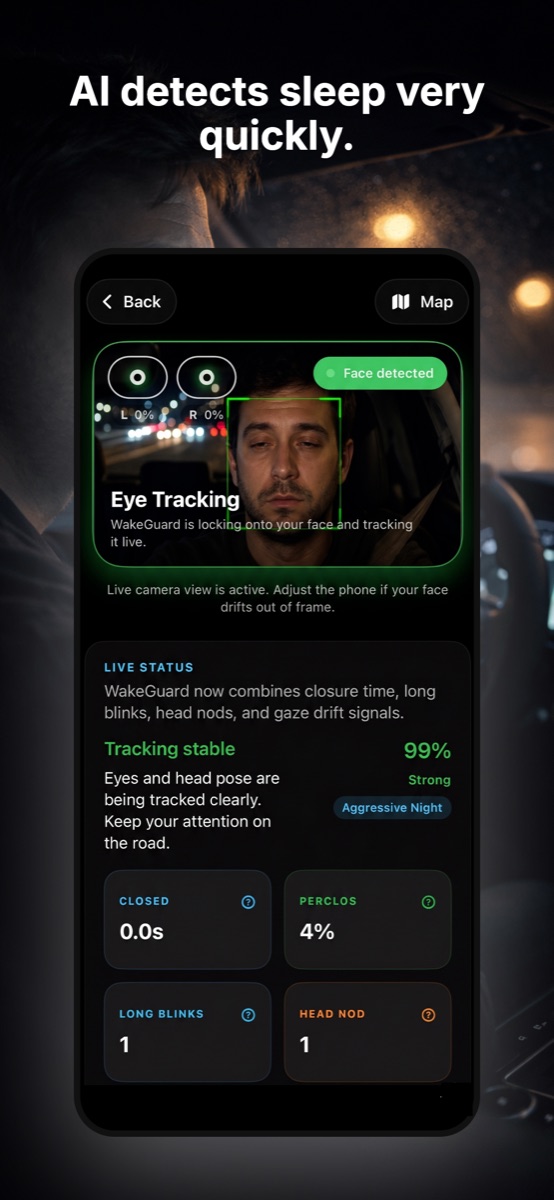
- While you drive: the AI monitors closure time, PERCLOS, long blinks and head nods in real time. Use Maps or music freely — picture-in-picture keeps the guard running.
- When risk rises: you get an early warning first. If your eyes stay closed too long, a full-screen Wake Up Check alarm sounds on iPhone and buzzes your Apple Watch until you tap "I'm Awake."
- When the alarm fires: treat it as your body's verdict, not a snooze button. Take the next exit and apply tactic #1 — the 20-minute nap.
- After the drive: your Drive Report shows protected time, blinks monitored and closures caught, so you learn which drives and hours are your personal danger zones.
Safety first: WakeGuard is a support tool, not a license to push through exhaustion. If you feel tired — or WakeGuard keeps catching you — pull over safely and rest. No arrival time is worth it.