Quick answer: The most effective trucker fatigue alarms use camera-based eye tracking (the technology in fleet driver-monitoring systems), not motion buzzers. Ear-clip head-tilt alarms only trigger after your head drops. An AI eye-tracking app like WakeGuard turns your mounted iPhone into a personal fatigue alarm that reads blinks and eye closures — free, private, and reporting only to you.
Fatigue is the long-haul occupational hazard
The FMCSA's hours-of-service rules exist because fatigue is a factor in a large share of heavy-truck crashes. But HOS compliance doesn't equal alertness: you can be fully legal and dangerously drowsy — after a bad sleep in a noisy truck stop, a 4 a.m. start, or the circadian slump that hits every driver between midnight and 6 a.m. and again mid-afternoon. Legal hours are the floor. Your eyelids are the truth.
The fatigue-alarm options, honestly compared
Ear-clip / head-tilt buzzers ($10–$30)
A tilt switch behind your ear that beeps when your head drops. The fatal flaw: your head drops after you fall asleep. It's a crash alarm, not a warning system — and most drivers abandon them within weeks because of false beeps from checking mirrors. Full breakdown in our anti-sleep alarm comparison.
Steering/motion-based dash gadgets ($30–$80)
Watch steering-input patterns or posture. Better than nothing, but indirect: they infer drowsiness from driving output, which means they alert late and false-alarm on rough roads.
Fleet driver-monitoring cameras (installed by carriers)
In-cab cameras with infrared eye tracking (PERCLOS-based) are genuinely effective — that's why fleets buy them. The tradeoff drivers know well: footage and events go to the carrier. Effective technology, uncomfortable ownership.
AI eye-tracking apps on your own phone (free)
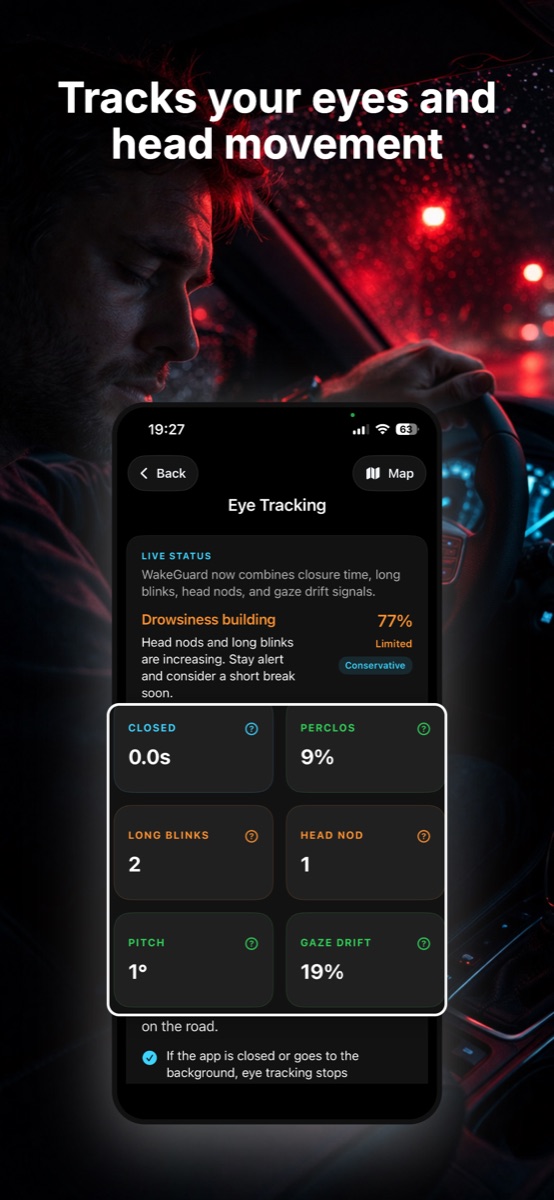
The same detection science — eye closures, blink duration, PERCLOS, head nods — running on the iPhone already mounted in your cab, answering to no one but you.
| Ear-clip buzzer | Fleet camera | WakeGuard app | |
|---|---|---|---|
| Detects | Head drop (after sleep) | Eyes + head (before sleep) | Eyes + head (before sleep) |
| Warns early | No | Yes | Yes — risk score + early warnings |
| Who sees the data | — | Your carrier | Only you — on-device, nothing uploaded |
| Cost | $10–$30 | Carrier-installed | Free download |
| Wrist alarm | No | No | Yes — Apple Watch haptics |
Fleet-grade eye tracking. Zero fleet surveillance.
WakeGuard reads your eyes with on-device AI and alarms on iPhone + Apple Watch before drowsiness wins. No account, no uploads, no one watching but the app.
Running WakeGuard on a long-haul day
- Mount it once, right. Dash or windshield mount, front camera angled at your face from slightly below eye level. In a truck cab you have mounting real estate — use a position that keeps your face in frame through mirror checks.
- Start tracking at wheels-up. Tap start, confirm "Face detected." If your face ever drifts out of frame on rough road, WakeGuard warns you instantly — no silent failures.
- Set sensitivity for the leg. Conservative for a fresh morning leg; higher sensitivity (or Night Mode's aggressive profile) for the 2 a.m. stretch and the post-lunch slump.
- Keep navigating. Trucker GPS app up front, WakeGuard watching from picture-in-picture. Protection doesn't pause.
- Respect the early warnings. When WakeGuard says drowsiness is building, that's your cue to target the next rest area — while you still have full control of the decision. If a Wake Up Check alarm fires (phone + Apple Watch), the decision is made: next safe stop, 20-minute nap.
- Use the Drive Report like an ELD for your eyelids. After each leg, see protected time, long closures caught and warnings given. Over weeks, your Protection Log shows exactly which routes, hours and sleep patterns put you at risk — data no buzzer ever gave you.
The non-negotiables still apply
- Protect your sleep window like a load lock — 7+ hours, dark cab, earplugs if needed.
- Front-load caffeine; don't chain it past mid-shift or it wrecks your next sleep.
- Use the 20-minute nap at the first Stage-2 warning sign — missed exits, speed wandering, heavy blinks.
- No app overrides hours-of-service rules or your own judgment. WakeGuard is the backstop, not the plan.