Quick answer: Stay alert on a long road trip by planning stops every 2 hours or 100 miles before you leave, rotating drivers every 2–3 hours, front-loading caffeine, avoiding the midnight–6 a.m. window, and running an AI drowsiness alert app between breaks. Highway hypnosis and fatigue build silently — schedule alertness instead of hoping for it.
Highway hypnosis: the road trip's quiet enemy
Long, uniform highways induce a trance-like state — you drive miles with no memory of them. It's attention running on autopilot, and it's the on-ramp to genuine drowsiness: the same monotony that hypnotizes you also lets drowsy-driving warning signs build unnoticed. On a road trip you're often also under-slept (early start, hotel bed) and carrying hours of accumulated vigilance fatigue. The countermeasure isn't willpower; it's structure.
Plan the trip around alertness
Before departure
- Full night's sleep, non-negotiable. Starting a 10-hour drive on 5 hours of sleep means driving impaired by mid-afternoon, guaranteed.
- Map your stops now. Every 2 hours / 100 miles, pick an actual place — a town, a rest area, a scenic point. Pre-committed stops happen; vague intentions don't.
- Schedule around the slumps. Avoid the midnight–6 a.m. window entirely if possible, and plan your longest break across the 1–3 p.m. circadian dip.
- Assign the wheel. With two drivers, rotate every 2–3 hours before anyone feels tired. The resting driver's job is to actually rest — and to watch the active driver for heavy blinks.
On the road
- Get out at every stop. Two minutes of walking and daylight resets alertness better than idling at a drive-through.
- Caffeine early, then taper. Save the second coffee for the afternoon slump; chaining caffeine masks fatigue you need to feel.
- Cool cabin, engaged driving. 65–68°F, cruise control off through the monotonous stretches — the full tactic list applies.
- Rotate stimulation. Podcast → conversation → silence → music. Novelty fights hypnosis; one continuous playlist feeds it.

The co-driver who never dozes off
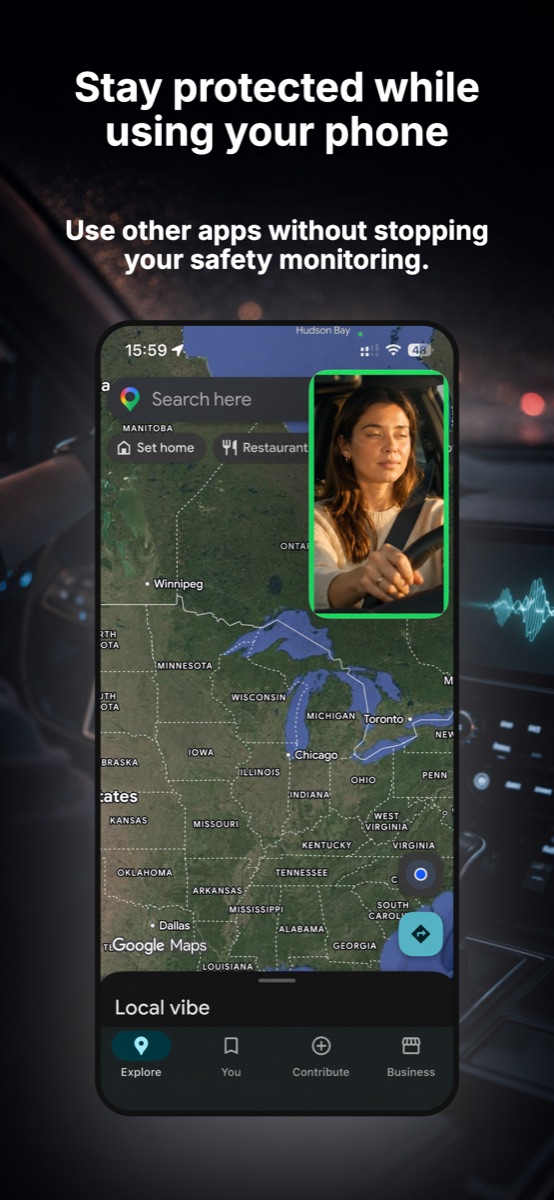
WakeGuard watches the driver's eyes for the whole leg — even while Maps navigates — and alarms on iPhone + Apple Watch the moment eyes stay closed too long. Free, on-device, private.
Using WakeGuard as your road-trip guard
Between stops is where fatigue does its quiet work — and where WakeGuard earns its mount:
- Start it with your navigation. Phone in the mount for Maps anyway? Open WakeGuard first, tap start, confirm "Face detected," then launch Google Maps or Apple Maps. Picture-in-picture keeps the AI watching your eyes in a floating window while you navigate.
- Swap drivers, re-lock the camera. At each rotation, the new driver taps start — WakeGuard locks onto the new face in seconds. Make it part of the seat-swap ritual, like adjusting mirrors.
- Let the risk score veto "one more hour." The classic road-trip mistake is stretching a leg because you feel fine. WakeGuard's live status shows drowsiness building — long blinks, rising PERCLOS, head nods — before you'd admit it. When it says risk is climbing, take the planned stop.
- The alarm is the hard line. If eyes stay closed too long, the Wake Up Check fires on the phone and buzzes the driver's Apple Watch until "I'm Awake" is tapped. One alarm = next exit, driver swap or 20-minute nap. No negotiation at 75 mph.
- Compare Drive Reports at the hotel. Protected time, closures caught, warnings given — per driver, per leg. It settles the "I was fine" debate with data, and tells you who should take tomorrow's early shift.
Road trip red flags: end the leg now
- Anyone hits rumble strips or drifts a lane
- A driver can't recall the last few miles (microsleep territory)
- WakeGuard fires a second Wake Up Check on the same leg
- It's past midnight and the "we'll just push through" conversation starts
The destination will still be there tomorrow. Swap drivers, nap 20 minutes, or get a room — the trip's best memory is everyone arriving.
Tip: keep a charger cable on the mount. Continuous camera use draws power, so top up while you drive — your phone arrives full and the guard never stands down.