Quick answer: To drive home safely after a night shift: take a 20-minute nap before leaving work, use caffeine only if your commute is short (it lingers and wrecks daytime sleep), wear sunglasses to blunt morning light, choose the simpler route over the faster one, and run a drowsiness alert app on every single commute — the danger is routine, so the protection must be too.
Why the post-shift drive is uniquely dangerous
After a night shift you're carrying two loads at once: sleep debt from being awake all night, and a circadian rhythm that flagged you for sleep hours ago and is now flooding you with morning "wind-down" signals. Studies of shift workers find alarmingly high rates of drowsy-driving incidents on post-shift commutes — in driving-simulator research, a large share of night-shift participants showed microsleep episodes within the first 15 minutes of a morning drive.
Three things make it worse than a normal tired drive:
- It's short, so you drop your guard. "It's only 25 minutes" — but most drowsy crashes happen close to home on familiar roads driven on autopilot.
- It repeats. A 1-in-500 risk per commute, run 200 times a year, is not a small risk.
- Morning light lies to you. Daylight makes you feel more awake than you are while your reaction time stays impaired.
The shift worker's commute protocol
Before you leave the building
- The 20-minute parking-lot nap. The single highest-value intervention. Recline the seat, phone timer, 20 minutes. You'll clear enough sleep pressure to transform the drive.
- Skip the end-of-shift coffee if you sleep after arriving home. Caffeine's half-life is ~5 hours; the cup that gets you home also steals your daytime sleep — making tomorrow's commute worse. Short commute → nap beats caffeine.
- Eat light. A heavy post-shift breakfast adds post-meal drowsiness on top of everything else.
On the road
- Sunglasses on. Blunting bright morning light helps preserve your ability to sleep when you get home — and reduces glare fatigue.
- Pick the boring-but-simple route. Fewer merges and decisions beat five saved minutes. Avoid long, monotonous highway stretches if a surface route exists.
- Cold cabin, engaged posture, no cruise control. The standard stay-awake tactics all apply — compressed into your 20–40 minutes.
- Carpool or rideshare on the brutal days. After a double or a rough shift, the strongest move is not driving at all.
A guard for every single commute
WakeGuard watches your eyes on the drive home and alarms on iPhone + Apple Watch at the first long closure. Free, no account, starts in seconds — easy to make a habit.
Making WakeGuard part of the clock-out routine
Because the post-shift drive repeats, protection only works if it's frictionless enough to happen every time:
- Keep a mount in the car permanently. Vent mount or dash mount, front camera facing your seat. Zero setup per drive.
- Clock out → phone in mount → tap start. WakeGuard confirms "Face detected" and starts guarding. It takes less time than starting your navigation.
- Drive your normal commute. Maps, podcasts, music — picture-in-picture keeps eye tracking live. In morning light or pre-dawn dark (Night Mode), the AI tracks closures, slow blinks and head nods.
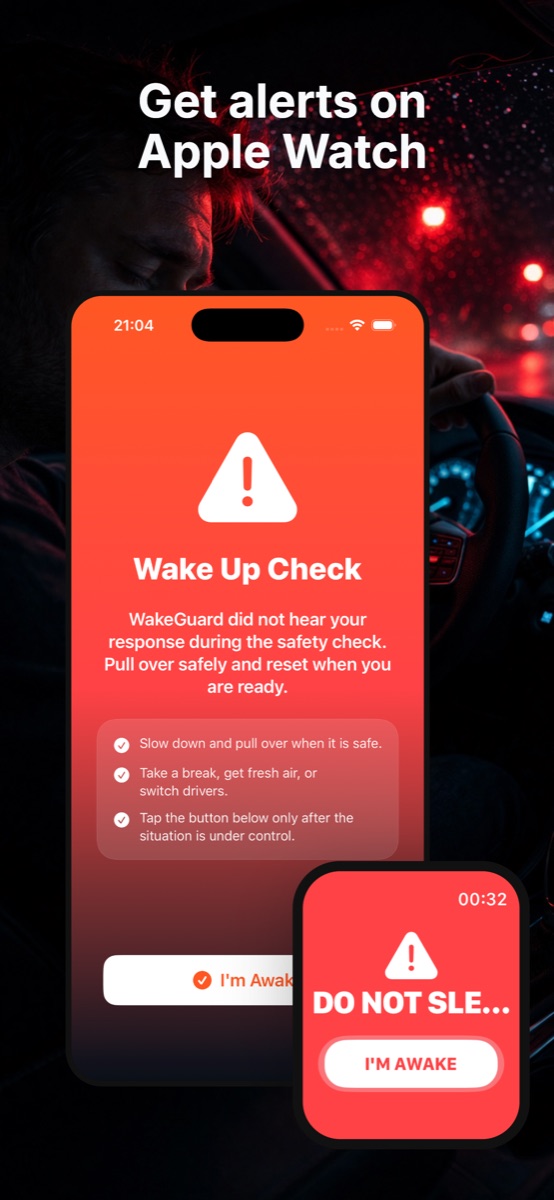
- If you start to fade, early warnings come first. A full Wake Up Check alarm — phone sound plus Apple Watch haptics — fires if your eyes stay closed too long, and won't quit until you tap "I'm Awake."
- Check your Protection Log weekly. If Tuesday commutes keep showing long closures caught, that's data: adjust your nap, your caffeine, or your schedule. The log turns "I felt fine" into facts.
When the answer is "don't drive"
Some mornings the protocol isn't enough. Treat these as hard stops: you nodded off at work, you had a microsleep on a previous commute this week, or WakeGuard fired multiple Wake Up Checks on your last drive. On those days: parking-lot nap first, and if you're still heavy-eyed, rideshare. Your car will be fine at work overnight; the math only has to go wrong once.
Chronic exhaustion isn't normal. If you're consistently fighting sleep on a 25-minute commute despite sleeping 7+ hours in the day, talk to a doctor — shift work sleep disorder and sleep apnea are common and treatable. WakeGuard is a safety net, not a treatment.